Hey,
first time octobercms installer. I installed the project as per the docs. Everything is running fine. Now I saw that 4.2 came out and wanted to update.
The release notes say
composer update
php artisan october:migrate
php artisan october:util set build
I wouldn’t know how that would help, because compose.json says "october/rain": "^4.1", so composer won’t do anything about it. I raised october/rain to 4.2 and run composer update still nothing much happens. I run the other two commands and it says
# php artisan october:util set build

* You are using October CMS version: v4.1.0
When I run the upgrade from the web interface, the same happens. See screenshots attached. Any advice?
Regards, theWebGuy
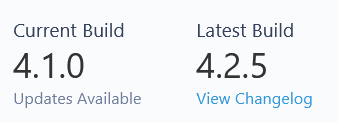
I can only put one image into a post.  Not entirely sure what good that did us …
There must be something keeping you on 4.1, show the require section of your composer.json file.
1 Like
# cat composer.json
{
    "name": "october/october",
    "description": "Built using October CMS: The Laravel-Based CMS Engineered For Simplicity",
    "type": "project",
    "homepage": "https://octobercms.com",
    "license": "proprietary",
    "require": {
        "php": "^8.5",
        "october/rain": "^4.2",
        "laravel/framework": "^13.0"
    },
    "require-dev": {
        "phpunit/phpunit": "^8.5|^9.0",
        "squizlabs/php_codesniffer": "^3.11"
    },
    "scripts": {
        "post-create-project-cmd": [
            "@php artisan key:generate --ansi"
        ],
        "post-autoload-dump": [
            "System\\Console\\ComposerScript::postAutoloadDump"
        ],
        "post-update-cmd": [
            "System\\Console\\ComposerScript::postUpdateCmd"
        ],
        "pre-package-uninstall": [
            "System\\Console\\ComposerScript::prePackageUninstall"
        ],
        "test": [
            "phpunit --stop-on-failure"
        ],
        "lint": [
            "phpcs"
        ]
    },
    "config": {
        "preferred-install": "dist",
        "allow-plugins": {
            "composer/installers": true
        },
        "audit": {
            "block-insecure": false
        }
    },
    "autoload": {
        "psr-4": {
            "System\\Console\\": "modules/system/console"
        }
    },
    "minimum-stability": "stable",
    "prefer-stable": true,
    "repositories": [{
        "name": "octobercms",
        "type": "composer",
        "url": "https://gateway.octobercms.com",
        "only": ["october/*", "*-plugin", "*-theme"]
    }]
}
Looks fine, what does the output say when you run composer update?
1 Like
# composer update
Loading composer repositories with package information
Updating dependencies
Nothing to modify in lock file
Writing lock file
Installing dependencies from lock file (including require-dev)
Nothing to install, update or remove
Generating autoload files
> System\Console\ComposerScript::postAutoloadDump

   INFO  Discovering packages.

  larajax/larajax ............................................................................................................................. DONE
  laravel/tinker .............................................................................................................................. DONE
  nesbot/carbon ............................................................................................................................... DONE
  nunomaduro/termwind ......................................................................................................................... DONE
  october/rain ................................................................................................................................ DONE

101 packages you are using are looking for funding.
Use the `composer fund` command to find out more!
> System\Console\ComposerScript::postUpdateCmd

* You are using October CMS version: v4.1.0
No security vulnerability advisories found.
Could you run these commands and share the output? This will help pinpoint where the mismatch is:
php -r "require 'vendor/autoload.php'; echo \System::VERSION . PHP_EOL;"
composer show october/system | grep -i version
# php -r "require 'vendor/autoload.php'; echo \System::VERSION . PHP_EOL;"
4.1
# composer show october/system | grep -i version

In ShowCommand.php line 325:

  Package "october/system" not found, try using --available (-a) to show all available packages.
Well, this looks weird. But the website and backend works, so … it should be there, no?
I think the issue is that your composer.json is missing the october/all package. This is the package that installs the core modules (System, Backend, CMS, etc.) and keeps them updated.
To fix this, click the “(reset)” link in your System Updates screen, or run in the CLI:
php artisan october:install
That will restore the package.
Thanks a bunch. Very weird, as I did not edit my composer.json after installing. Must have mixed up some :install along the way, because I did not find anyone else having this problem.
The composer.json in the october git repo does not have october/all as well. 
1 Like


